
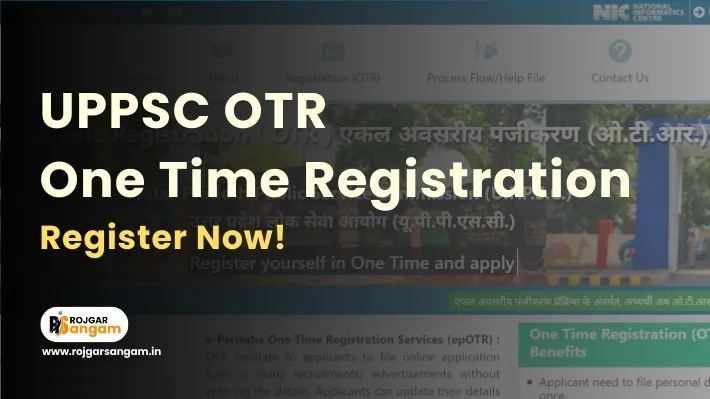
Uttar pradesh public service commission has introduced a simplified registration system called one time registration to make application process easier for candidates. if you’re planning to apply for any uppsc exam, completing uppsc otr registration is now mandatory. this guide will walk you through everything you need to know about uppsc one time registration online form and uppsc otr online registration process. Also Read – UP Home Guard Online Form 2025 (41,424 Posts)
What is UPPSC OTR?
UPPSC OTR (One Time Registration) is a unified registration system launched on 04 Jan 2023 by hon’ble chief minister yogi adityanath ji. this system allows candidates to register once and use same profile for all future uppsc examinations. through this registration, you upload your personal details, educational qualifications, photograph, and signature just once.
UPPSC OTR Registration 2026: Key Highlights
Before appearing for any uppsc exam in 2026, let’s take a look at key aspects of uttar pradesh public service commission one time registration process:
| Parameter | Details |
| Conducting Authority | Uttar Pradesh Public Service Commission (UPPSC). |
| System Name | UPPSC One Time Registration (OTR). |
| Applicable Year | Active Since 2023. |
| Mode of Registration | Online only (Mandatory for All UPPSC Exams.) |
| Purpose of OTR | Single-Time Registration for All UPPSC Recruitment Examinations. |
| Data Editing | Limited Fields Editable After Registration as Per Portal Rules. |
UPPSC OTR Benefits?
UPPSC OTR benefits are numerous and make the application process much more convenient:
| Benefit | Details |
| Time-Saving | You don’t need to fill personal and educational details repeatedly for each exam. |
| 24/7 Accessibility | Your otr profile is digitally available round clock. provided you have your login credentials. |
| Easy Modification | You can update your personal details, photograph, and signature anytime. |
| Centralized Dashboard | Access your all application forms, exam details, and interview information from a single candidate dashboard. |
| No Registration Fee | One time registration is completely free for all candidates. |
| Permanent Validity | No expiry date for otr registration. |
UPPSC OTR Important Date
| Event | Date/Status |
| Notification Release | 03 Jan 2023 |
| OTR System Launch | 04 Jan 2023 |
| Registration Start Date | 04 Jan 2023 (Ongoing) |
| Registration Last Date | No deadline – Registration is always open |
| Modification Allowed | Anytime (Always open) |
| Validity Period | Permanent |
UPPSC OTR Eligibility Criteria
The uppsc otr eligibility criteria are simple and inclusive:
| Eligibility | Details |
| Nationality | Must be an Indian citizen. |
| Age Limit | 18 To 40 Years (As Per Exam Rules). |
| Qualification | Minimum Class 10th Pass is Required. |
UPPSC OTR Documents Required
Before starting your uppsc otr online registration process, keep these documents ready:
| Document | Details |
| Photograph | Size: 5cm width × 6cm height, Less than 50KB, 200 DPI, White background, JPG/JPEG format. |
| Signature | Size: 6cm width × 3cm height, Less than 30KB, 200 DPI, Black ink, JPG/JPEG format. |
| Valid Email ID | A Valid email ID (if not already registered on portal) |
| Valid Mobile Number | A Valid mobile number (if not already registered on portal) |
| Aadhaar Card | Aadhaar card mandatory for all applications (mandatory for OTR). |
| Education Certificate | 10th, 12th, and Graduation mark sheet or certificate. |
| Caste Certificate | Valid Caste certificate required for SC/ST/OBC/EWS applicants. |
💡Digital Copies of All Documents Should Clear, Readable and Within Specified Size and Format.
Step by Step: UPPSC OTR Online Registration Process 2026
Follow this detailed uppsc otr online registration process to complete your registration successfully:
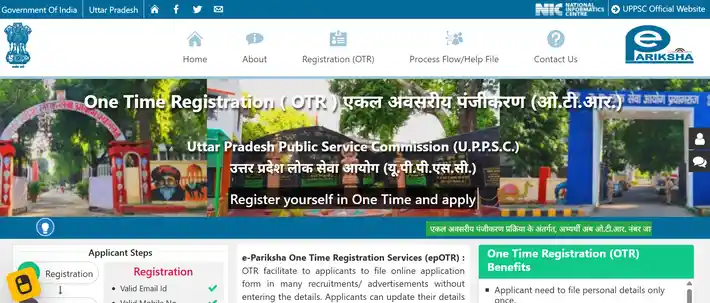
- Step 1: Visit the official portal at www.otr.pariksha.nic.in
- Step 2: On the homepage, click on “Registration (OTR)“.
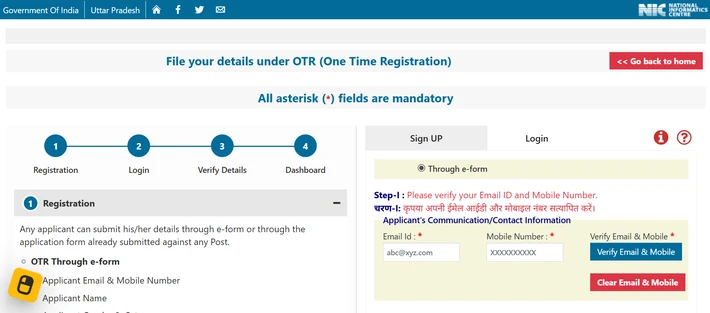
- Step 3: Enter Your Contact Details: Enter Email ID > Enter Mobile Number > Click on Verify Email & Mobile.
- Step 4: Verify Email & Mobile Number: Enter OTP you received on your email ID & Mobile Number and Click to “Verify” Button.
- Step 5: Upload Your Photo/Signature: Click on “Upload Photo and Signature” option. > Upload Your Photo/Signature according to specified dimensions, format, and size.
- Step 6: Fill Personal Details: Full name (as per your official documents) > Date of birth > Gender > Father’s name > Mother’s name > Category (General, OBC, SC, ST) > Domicile state and district > Citizenship status > Marital status > Aadhaar No.(Last 06 digit).
- Step 7: Fill Educational Details: Enter your 10th, 12th, and Graduation educational details such as (board, year of passing, roll number).
- Step 8: Submit to Final Register: Finally verify your details and click to “Register” button.
💡Once you’ve completed all steps, click on “Get OTR Number Immediately” to generate your unique registration number. Your OTR number will be displayed on the screen, and you’ll also receive it via email and SMS.
Modifying Your UPPSC OTR Details
Need to update information? the UPPSC OTR modification process is straightforward:
- Step 1: Visit the official UPPSC website at www.uppsc.up.nic.in
- Step 2: Go to the “OTR Section” tab.
- Step 3: Click on “OTR Modification” link.
- Step 4: Login using your OTR number or email ID with password.
- Step 5: Make the necessary changes.
- Step 6: Click “Update OTR Details” to save.
Important Information and Guidelines
Read official guidelines carefully before applying for service. some useful important links are provided below:
| Related Link | Link/Email/Details |
| OTR Registration | Click Here to Register for a New OTR. |
| OTR Login | If You Already Have an OTR, Click Here to Login. |
| Notification | Click to Download Official Notification |
| OTR Guidelines | Click to Download OTR Guidelines and Help |
| UPPSC OTR Official Website | Click to Open www.otr.pariksha.nic.in |
| UPPSC Official Website | Click to Open www.uppsc.up.nic.in |
| Email Support | online.uppsc@nic.in |
| Official Helpline Number | 0532 – 2407547 |
Join Rojgar Sangam community for updates:
| Subscribe to Rojgar Sangam | YouTube Channel |
| Join Rojgar Sangam | Telegram Channel |
| Join Rojgar Sangam | WhatsApp Channel |
| Join Swadeshi Rojgar Sangam | Arattai Channel |
| For any questions, contact us at: support@rojgarsangam.in | |
Frequently Asked Questions (FAQs)
Here are some commonly asked questions about uppsc otr registration will help you understand the process better.
Q: What is UPPSC OTR registration?
Ans: UPPSC OTR (One Time Registration) is a single profile system where candidates save personal and educational data once and reuse it for all UPPSC applications.
Q: How to complete the uppsc one time registration online form?
Ans: Visit the official OTR portal, verify mobile/email via OTP, fill personal and education details, upload photo/signature and submit to get your OTR number.
Q: What documents are required for UPPSC OTR registration?
Ans: Recent photo, signature, ID proof (Aadhaar/Voter), educational certificates, DOB proof and category certificates if applicable.
Q: Can I edit my details after OTR number is issued?
Ans: Yes — most personal details can be updated except mobile number, email, home state and home district (confirm exact editable fields on portal).
Q: Where do I get help if I face issues with OTR?
Ans: Use the UPPSC helpdesk/helpline provided on the official portal; also check the Candidate Dashboard and official notifications.
jobs available in private sector
Today I am telling you about rojgarsangam.in website. I am using this website since 4 years.
Sir mera unmarried ka haryana domicile hai or ab main married hu to kya unmarried wala hi domicile chl jayega ya new apply karna padega domicile
In Uttar Pradesh, income certificate and residence certificate for girls are from the husband’s side. Caste certificate should be from the father’s side. Hence, my advice is to get a new residence certificate made.
Rat ke 2 baje kr rha hu… Ek hi bar me 10 minute me ho gya.. mast site chal rhi
Server load is less during night time. That is why it is said to do it at night
Details fill krne k baad register p click Kiya h …. 1- 2 hrs ho gy tb se Loading e dikha ra h…. Na back e ja ra na forward
Server load work happens during night time. That is why it is said to do it at night.