
Uttar Pradesh Scholarship Dates & Timeline 2026
Scholarship timeline follows an academic year cycle. students must track uttar pradesh scholarship dates carefully to avoid missing deadlines. Also Read - Rajasthan Post Matric Scholarship Scheme 2026 Important DatesActivity | Class 9th-10th | Class 11th-12th | UG/PG Courses |
Application Start Date | 02 Jul 2025 | 02 Jul 2025 | 10 Jul 2025 |
Last Date to Apply Online | 30 Oct 2025 | 30 Oct 2025 | 20 Dec 2025 |
Last Date to Complete Form | 31 Oct 2025 | 31 Oct 2025 | 23 Dec 2025 |
Last Date to Submit Hard Copy | 04 Nov 2025 | 04 Nov 2025 | 24 Dec 2025 |
Start Date for Correction | 18 Nov 2025 | 18 Nov 2025 | N/A |
Last Date for Correction | 21 Nov 2025 | 21 Nov 2025 | N/A |
UP Pre Matric & Post Matric Scholarship Eligibility Criteria
Before you begin your up scholarship online registration, it is crucial to check if you meet the eligibility criteria. requirements differ slightly for pre and post-matric scholarships.UP Pre Matric Scholarship Eligibility Criteria
| Eligibility | Criteria |
| Studying in Class | Students must be studying in class 9th or 10th in a recognized school in uttar pradesh. |
| Qualification | Must have passed previous year’s class (8th or 9th). |
| Category | SC/ST/OBC/Minority or General category students applying. (as per category rules) |
| Annual Family Income | Annual family income should not exceed ₹2,50,000. |
UP Post Matric Scholarship Eligibility Criteria
| Eligibility | Criteria |
| Studying in Class | Students must be studying in class 11th, 12th, UG, PG or diploma in a recognized school/board/university in uttar pradesh. (Full-Time Courses) |
| Qualification | Must have passed previous year’s class (10th, 11th or others courses). |
| Category | SC/ST/OBC/Minority or General category students applying. (as per category rules) |
| Annual Family Income | Annual family income should not exceed ₹2,50,000. |
Documents Required for UP Scholarship Application Form
Gathering all necessary documents beforehand ensures a smooth application process. you will need scanned copies of the following:| Document Type | Specific Details |
| Education Details | Previous year's mark sheet or certificate. |
| Admission Details | Current year fee receipt or admission details. |
| Aadhaar Card | Aadhaar card mandatory for all applications. |
| Domicile Certificate | Required for residents of uttar pradesh |
| Caste Certificate | Caste certificate required for EWS/SC/ST/OBC applicants. |
| Income Certificate | Family income certificate (recent, not older than 6 months). |
| Minority Certificate | Minority certificate required for minority community applicants. |
| Disability Certificate | Disability certificate is required for disabled students. |
| Bank Account | Bank account in your name linked to aadhaar. first page of passbook, which shows account holder's name and IFSC details, must be uploaded scanned copy. |
| Photographs | Passport-size photo colored, white background, JPEG format, under 20KB. |
| Mobile Number & Email ID | A Valid mobile number & email ID (if not already registered on portal) (Mobile number linked with aadhaar) |
| For Renewal Candidates | Keep your previous year’s registration number handy. need to login and update your details. |
💡All documents must be self-attested and digital copies must be clear, readable and within the specified file size limit.
Step-by-Step Guide: UP Scholarship Online Registration Process
Follow these steps to complete your uttar pradesh scholarship online application process without any errors.Uttar Pradesh Scholarship Apply Online
Correctly completing form is crucial for approval. one-time registration (OTR) is required before submitting application in 2026.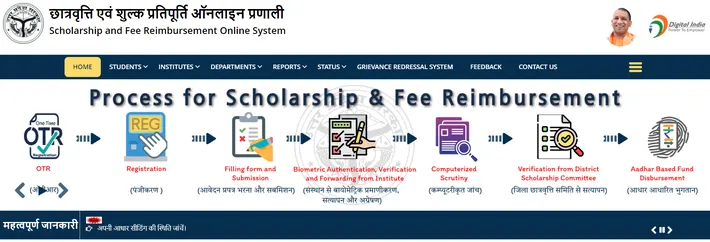
- Step 1: Complete Your OTR (One Time Registration).
- Visit the official portal scholarship.up.gov.in.
- Click on OTR (One Time Registration) and enter your correct information.
- Mobile Verification: Select caste group < Enter mobile number < Enter captcha < Click on Generate OTP. < Enter received OTP < Enter captcha < Click on Verify OTP.
- e-KYC: Enter Aadhaar number < Enter Captcha < Login to DigiLocker and follow all instructions. < Click on Generate e-KYC < Enter OTP < Click on Verify e-KYC.
- Final OTR: Enter your parent's name < Enter Email ID < Enter Captcha < Click on Submit.
Once you click on submit, your OTR will be completed and you will receive an OTR number something like "UP25-71********". note it down for later use.
- Step 2: Fill New Registration Form.
- Visit UP Scholarship official portal www.scholarship.up.gov.in and look for "Student' Section"
- If you applying for first time, click on "New Registration."
- If you need to renew, click on "Renewal Login."
- Click on options based on your course and category (e.g., pre-matric, post-matric, intermediate, post-matric other).
- Enter your OTR number < Submit < Enter basic details such as district, educational institution, class/caste group, religion, high school details, create a strong password, and click "Proceed Registration."
- Visit UP Scholarship official portal www.scholarship.up.gov.in and look for "Student' Section"
💡You will receive a registration number. save this number safely.
- Step 3: Login & Completing Your Application Form
- Click on login link 'Fresh Login' for 'Student' section and enter your registration number, OTR number, your password, and captcha code to login to your account.
- Personal Details: Enter your name, parents' name, gender, date of birth, category, religion, etc.
- Address: Enter your permanent and current complete address along with your PIN code.
- Institution Details: Enter your school/college name, course, year of study, and institution code.
- Academic Information: Enter your previous exam marks, board details, roll number, etc.
- Fee Details: Enter your annual non-refundable amount (check with your institution if unsure).
- Bank Details: Enter your account number, IFSC code, and bank name (only for Aadhaar-linked accounts).
- Step 4: Upload Photos & Documents: Passport-sized photo (JPG, less than 200KB), signature (JPG, less than 100KB), documents should be readable PDF files (less than 500KB). upload and save.
- Step 5: Submit Within 24 Hours: Review your application using the "Preview" option. once satisfied, click "Final Submit." immediately note application number.
- Step 6: Print & Submit a hard copy: Within 3 days, print your application and submit it to your institution's scholarship coordinator. take a receipt as proof.
💡Submit hard copies of required documents to your college before deadline. missing this will invalidate your online application.
Step-by-Step Guide: UP Scholarship Renewal Process
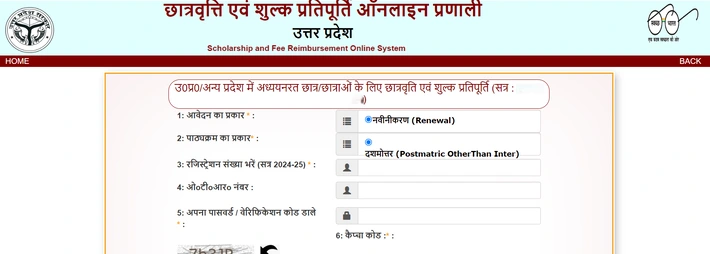
If you received a scholarship last year, you don't need to register again. you simply need to use up scholarship renewal process:- Go to official portal and click on 'Renewal Login' option from 'Student' section.
- Log in using your previous year's registration number and password.
- Your old details will be pre-populated. update necessary information, such as your current course year and previous year's marks, etc.
- Submit form and submit hard copy to your institute.
How to Check UP Scholarship Status
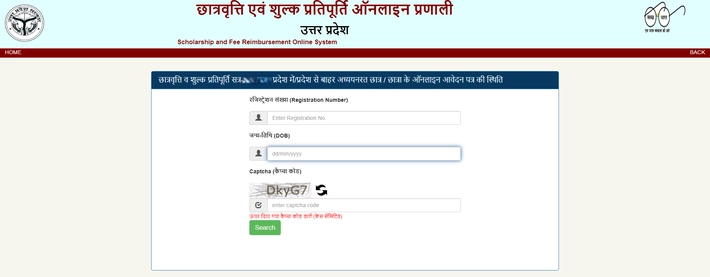
It's important to know how to check your up scholarship status. this tells you whether your application is verified, pending, or rejected:- Go to official website www.scholarship.up.gov.in and select your application from 'Status' section and click on it. (e.g., application status 2023-24).
- Enter your registration number and date of birth < enter captcha < click 'Search'.
- Your current application status will be displayed on screen.
Important Information and Guidelines
Please read the complete official guidelines before applying for any services. below are the necessary hyperlinks to related resources: The necessary hyperlinks to related articles are as follows| Service Link | Link/Email/Details |
| OTR Registration | Submit for OTR Application |
| Apply Now | For First-Time Scholarship Registration |
| Fresh Login | Fresh Application Login |
| Renewal Login | Renewal Application Login |
| Track Status | Check Application Status |
| Official Portal | www.scholarship.up.gov.in |
| Helpline | 0522-2288861, 0522-2286199 |
| Email Support | helpdesk@scholarship.up.gov.in |
Join the Rojgar Sangam community for updates:
| Subscribe to Rojgar Sangam | YouTube Channel |
| Join Rojgar Sangam | Telegram Channel |
| Join Rojgar Sangam | WhatsApp Channel |
| Join Swadeshi Rojgar Sangam | Arattai Channel |
| For any questions, contact us at: support@rojgarsangam.in | |
0 Comments